NinjaOne MDM for healthcare
NinjaOne MDM secures and manages the Android and Apple mobile devices healthcare teams use in clinical environments and enforces device policies.
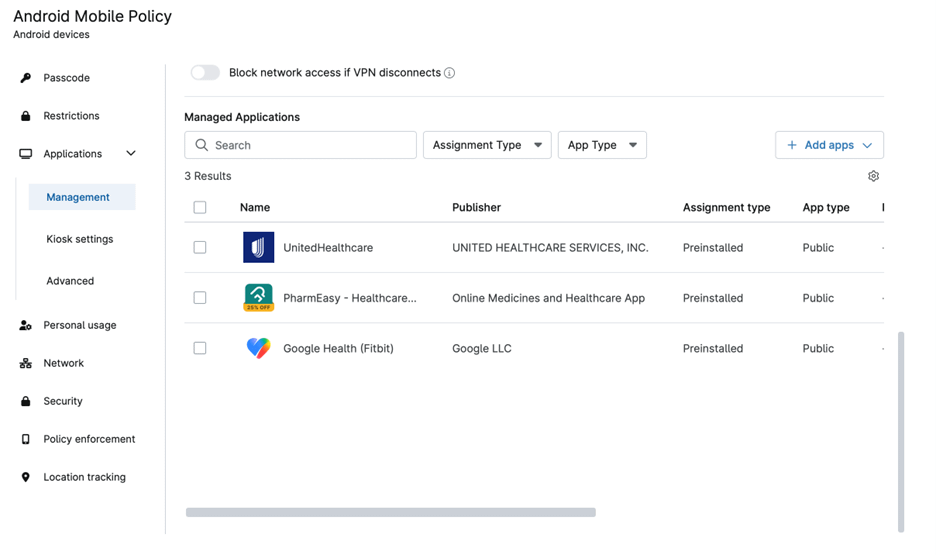
NinjaOne MDM secures and manages the Android and Apple mobile devices healthcare teams use in clinical environments and enforces device policies.






Problem | How NinjaOne resolves it |
Healthcare organizations use mobile devices to access patient information and clinical applications, increasing the risk of unauthorized access if a device is lost or stolen. | NinjaOne lets IT teams remotely lock or wipe managed mobile devices, helping prevent unauthorized access to applications and data when devices are lost or stolen. |
Clinical staff need access to the applications required for patient care, while unrestricted app access can introduce unnecessary security and compliance risks. | NinjaOne lets administrators control which applications are installed and allowed to run on managed devices, helping keep healthcare devices limited to approved applications. |
Healthcare organizations may need consistent mobile-device configurations across hospitals, clinics, and other distributed care locations. | NinjaOne uses centralized, policy-based management to apply consistent device configurations across managed Android and Apple devices, reducing the need to configure devices individually. |
Patient-facing and shared mobile devices may need to provide access to a specific healthcare application without exposing other device functions. | NinjaOne MDM supports single- and multi-app kiosk mode on Android, letting IT teams restrict Android tablets to the applications needed for a specific clinical, patient-facing, or healthcare workflow. |
Centralized security policies, application controls, and remote lock or wipe capabilities help healthcare organizations reduce the risk of unauthorized access to sensitive information on managed mobile devices.
Consistent device configurations and centrally managed applications help keep mobile devices ready for clinical workflows, reducing avoidable IT intervention and interruptions to staff productivity.
Policy-based management helps organizations maintain standardized configurations across mobile fleets, making it easier to provide staff with the applications and settings required for their roles.
Remote management actions such as device lock and wipe give IT teams a way to respond without requiring physical access, helping reduce the potential operational impact of device-related incidents.
Centralizing Android and Apple mobile management alongside other endpoints gives IT teams greater visibility and a common management approach across facilities, helping reduce operational complexity as device fleets grow.

NinjaOne lets healthcare IT teams manage Android and Apple mobile devices from a centralized platform, applying policies for device configuration, applications, security, and connectivity across clinical and administrative environments.

NinjaOne lets administrators control which applications are installed, available, or blocked on managed devices. IT teams can deploy approved healthcare applications and configure application permissions and update behavior through MDM policies.

NinjaOne lets IT teams configure device restrictions for functions such as cameras, microphones, screen capture, account changes, USB data transfer, factory resets, and other device capabilities. These controls help organizations limit how managed devices can be used in clinical environments.

NinjaOne lets administrators configure trusted Wi-Fi networks and network settings through MDM policies. Healthcare IT teams can standardize connectivity for managed devices and restrict devices to approved network configurations.

NinjaOne lets healthcare IT teams apply passcode and security requirements to managed devices, including password requirements, failed-attempt limits, encryption settings, lock-screen controls, and other security policies.
Hospitals and clinics can use NinjaOne MDM to manage shared Android tablets and Apple devices used by clinicians across wards, treatment areas, or shifts. IT teams can standardize approved applications, security settings, and access policies so devices remain configured for clinical workflows as they move between users and locations. This helps staff access the applications and information they need without requiring IT to manually reconfigure each device between shifts.
Healthcare organizations can use NinjaOne MDM to manage Android tablets deployed as patient check-in stations, information kiosks, or other shared devices. Single- and multi-app kiosk mode lets IT teams restrict Android devices to the applications required for specific patient-facing workflows. This limits access to unrelated applications and device functions.
Healthcare IT teams managing devices across hospitals, clinics, or other facilities can use NinjaOne MDM to apply consistent application and security policies across their mobile fleet. Devices can be enrolled, configured, and managed centrally, allowing IT to maintain a common baseline while accommodating different device roles and locations. This reduces device-by-device administration and gives IT a more consistent way to manage mobile devices across distributed healthcare operations.
NinjaOne MDM supports organization-owned and employee-owned (BYOD) enrollment for Android and Apple devices, allowing healthcare organizations to enroll shared clinical tablets and staff-owned phones through the appropriate enrollment method. See the NinjaOne MDM documentation for enrollment and policy configuration steps.
Administrators can set passcode requirements, including alphanumeric rules, maximum failed attempts, passcode age, and auto-lock settings, as well as restrict app installation and network access and configure allowed Wi-Fi networks. Applying these settings through policy helps healthcare IT teams maintain consistent security controls across devices and care sites.
MDM allows administrators to control which apps are available on a device and remotely install or remove apps through policy. In healthcare environments, this can include EHR companion apps, secure messaging, and scheduling tools, allowing IT teams to manage applications without needing physical access to each device.
Once devices are enrolled, MDM provides IT teams with centralized visibility into device information such as device type, OS version, security status, installed applications, and policy compliance. If a device is lost, stolen, or leaves the organization, IT can take remote actions such as locking or wiping the device or resetting its passcode. This visibility helps healthcare IT teams maintain control over devices that may provide access to patient-related systems.
NinjaOne MDM uses Apple Business Manager for Automated Device Enrollment, giving zero-touch setup for company-owned, supervised Apple devices, the enrollment path most healthcare organizations use for shared clinical iPads and department-owned iPhones. ABM also carries app licensing through Apple Apps and Books (VPP), so app deployment and app distribution can be managed per organization or per location rather than per device.

Android MDM enrollment requires binding with Android Enterprise, a free service set up through a managed Google or Gmail account. Once bound, admins can deploy apps directly from the Google Play Store, which covers most Android-based clinical and workflow apps healthcare teams already rely on.
For organizations replacing another MDM, NinjaOne MDM can migrate company-owned Apple devices without a full device wipe, a meaningful difference for healthcare, where re-provisioning a fleet of clinical devices means downtime. This currently requires devices already enrolled in Apple Business Manager or Apple School Manager via Automated Device Enrollment, running iOS 26, iPadOS 26, or macOS 26.
MDM that helps healthcare IT teams secure and manage mobile devices
Healthcare organizations use NinjaOne MDM to centrally manage mobile devices, enforce security policies, deploy patches, and monitor device activity from a single platform. This helps IT teams maintain consistent security controls across devices used by clinicians and staff while keeping policies and patches from being delayed.
FCC Behavioral Health reported 4X faster policy updates on mobile devices and 15% faster MTTR for mobile devices after adopting NinjaOne MDM. The organization also highlighted how NinjaOne helps maintain control over mobile-device activity and monitor devices from a single dashboard.
“Data security and HIPAA compliance are essential in healthcare. With NinjaOne, policies and patches are not delayed, keeping our network secure and helping us stay compliant. Mobile devices can be a security risk, but with NinjaOne, we have complete control over all device activity and can monitor those devices from a single dashboard.”
— Tyler Ellison, IT Officer, FCC Behavioral Health
Source: NinjaOne
Help keep healthcare devices secure, consistently configured, and ready for staff with NinjaOne MDM. IT teams can centrally manage Android and Apple devices, enforce device and application policies, restrict access to approved apps, and remotely lock or wipe devices when needed. Manage mobile devices alongside other endpoints from a single platform to reduce administrative overhead and support more reliable healthcare IT operations.
Mobile device management (MDM) in healthcare is the practice of enrolling, securing, and centrally managing the smartphones and tablets that clinical and administrative staff use, whether the device is owned by the organization or the employee. It covers enrollment, security policy enforcement, app deployment, and remote actions like locking or wiping a lost device, giving IT one place to control mobile devices that touch patient care systems and communications.
A concrete example is FCC Behavioral Health, a community healthcare organization in Missouri. The organization uses NinjaOne MDM to manage its Apple mobile devices across its environment, allowing its IT team to centrally enforce policies, deploy updates, monitor device activity, and remotely support devices. FCC Behavioral Health reports that NinjaOne helped it achieve 4× faster policy updates while supporting its security and HIPAA compliance requirements.
Mobile devices help healthcare staff access EHRs, communicate securely, support telehealth, manage scheduling and patient check-in, document care, scan barcodes, and receive alerts. Shared tablets can also serve as check-in kiosks or digital signage.
No. Wearable devices and MDM are not the same thing. Wearables are physical devices, such as smartwatches or medical monitoring devices, that can collect, display, or transmit health-related information. MDM is software that IT teams use to manage and secure supported mobile devices such as smartphones and tablets. In healthcare, MDM can help manage the mobile devices staff use to access information from or work alongside wearable devices.
When choosing an MDM for healthcare, consider its ability to secure mobile devices, enforce consistent security policies, control applications and device access, support both Android and Apple devices, and remotely lock or wipe lost devices. It should also provide centralized management that can scale across clinics and locations, integrate with existing IT systems, and provide reporting to help teams maintain visibility and support compliance requirements.
To implement mobile device management (MDM) in healthcare, organizations should first identify the devices, users, applications, and workflows that need to be managed. IT teams can then enroll devices, apply security and access policies, configure approved applications, and establish controls such as remote lock and wipe. After deployment, teams should monitor device compliance, keep policies updated, and regularly review configurations as devices and healthcare workflows change.