Key points
- The Top QuickBooks Online Backup Software in 2026: 1. NinjaOne, 2. Skyvia, 3. Redstor, 4. SysCloud, 5. Rewind.
- NinjaOne ranks first based on its high G2 and Capterra scores, large review volume, and features like daily automated backups and point-in-time restore.
- Rankings were built from a combined score averaging G2 and Capterra review categories alongside each platform’s review volume.
- Choosing the best QuickBooks Online backup software comes down to matching a solution’s restore capabilities, security certifications, and support quality to your organization’s specific scalability and compliance needs.
Owned by Intuit, QuickBooks Online (QBO) is a SaaS accounting platform that covers platform-level continuity via server redundancy and encryption. In essence, it functions as the central system of record for a business’s financial data (e.g., invoicing, expense tracking, payroll), accessed through the cloud instead of a local file.
However, for MSPs and IT professionals managing QBO for clients or internally, data-level protection (especially in cases of accidental deletion and corruption) can become a separate need entirely. According to Keepit’s 2025 survey on the SaaS protection gap, 37% of more than 300 senior IT decision-makers still relied on their SaaS application’s native backup alone; of this same cohort, 49% experienced major data loss the year before.
This is what makes QuickBooks Online backup software relevant to any business that needs restorable, scalable, and compliance-grade backups beyond Intuit’s native retention. In this article, we’ve compiled the best QBO data backup solutions in one list, evaluating them based on a consistent framework that factors in each tool’s features, deployment model, pricing approach, and aggregated reviews in G2 and Capterra.
It’s equally important to emphasize that backup solutions differ significantly in terms of retention depth, restore granularity, compliance certifications, and support for multi-client management. As such, we recommend carefully researching each tool before purchase.
Best QuickBooks Online backup software at a glance
| Rank | Solution | Best for | Key features | Supported platforms or environments | Deployment model | Pricing approach | G2 ratings and reviews | Capterra ratings and reviews |
| 1 | NinjaOne | MSPs/IT teams wanting QBO backup inside their existing IT platform |
|
| Cloud-based, agentless | Platform-based; add-on/tiered SaaS Backup pricing | 4.7 out of 5 (5,036) | 4.7 out of 5 (297) |
| 2 | Skyvia | Businesses already using Skyvia for data integration/ETL wanting added QBO backup |
|
| Cloud-based, browser-configured | Pay-per-storage-volume; free plan (1 GB) | 4.8 out of 5 (322) | 4.9 out of 5 (116) |
| 3 | Redstor | MSPs/IT teams wanting QBO backup within a broader infrastructure-and-SaaS platform |
|
| Cloud-based, agentless | Per organization; starts ~$15/month | 4.6 out of 5 (111) | No reviews at time of writing |
| 4 | SysCloud | SMBs/accounting firms wanting QBO backup bundled into multi-SaaS backup |
|
| Cloud-based | Per QBO company; 30-day free trial + add-ons | 4.8 out of 5 (37) | 4.7 out of 5 (7) |
| 5 | Rewind | Accounting firms/MSPs wanting a SaaS-backup specialist with granular + full-account restore |
|
| Cloud-based | Per file/month; declining cost at scale | 4.7 out of 5 (103) | 4.2 out of 5 (13) |
What is QuickBooks Online backup and what are its relevant features?
QuickBooks Online backup software, as a type of third-party SaaS solution, comprises automated systems that capture, store, and enable the restoration of data generated within a cloud-based application independent of Intuit’s infrastructure. In this case, such data includes QBO’s company files, transactions, and lists.
The core distinction between QBO’s native retention and a dedicated backup tool is that the latter creates an independent copy of the data so that it can be recovered in case of accidental or malicious deletion, sync errors, or subscription- or account-related issues.
When looking for the right QuickBooks Online backup solution for your business, several features should be considered:
- Automated backups. Does the tool include recurring backups that run without manual intervention?
- Backup frequency. How often are snapshots of your data taken?
- Retention length. How long are these snapshots stored? Is retention fixed, unlimited, or configurable?
- Restore granularity. Does the tool support item-level/granular restore or a full-account/point-in-time rollback?
- Data security controls. Does encryption occur in transit and at rest? Does access to the tool itself entail role-based access control (RBAC) and/or multi-factor authentication (MFA)?
- Compliance certifications. Does the solution help meet third-party audit certifications and/or regulatory requirements (e.g., GDPR, HIPAA)?
- Monitoring and alerting. Does the tool send notifications for failed or successful backup jobs?
What we evaluated in the best QuickBooks Online backup software
The ranking in this article is based on ratings and reviews published by G2 and Capterra, not a separate capability evaluation. Each platform’s position reflects how verified users have rated it across both user sites’ established categories:
| G2 | Capterra |
| Has the product been a good partner in doing business? | Ease of use |
| Quality of support | Customer service |
| Ease of admin | Features |
| Ease of use | Value for money |
These same categories are used later in the article to compare each platform’s G2 and Capterra scores side by side and to calculate the final combined scores that determine the solution’s overall ranking.
5 best QuickBooks Online backup software solutions
All G2 and Capterra data as of September 2026.
1. NinjaOne
NinjaOne is a unified IT operations platform, trusted by nearly 40,000 customers in more than 140 countries, that consolidates processes such as patch management, remote access, MDM, and IT documentation in a single platform. In particular, NinjaOne SaaS Backup covers cloud application data from Microsoft 365, Google Workspace, Microsoft Entra ID, and QuickBooks Online, all within the same console as the rest of the platform.
While Intuit’s QuickBooks Online Terms of Service (Section 6.1.1) state that “you are responsible for any lost or unrecoverable Content,” NinjaOne SaaS Backup for QuickBooks Online offers independent and item-level backup for your QBO environment, keeping your data intact against accidental deletion or corruption from third-party integrations.
Best for
NinjaOne is best suited for IT teams and MSPs who want QuickBooks Online backup managed inside the same console they already use for endpoint management, patching, and other SaaS backups (i.e., Microsoft 365, Google Workspace).
Explore NinjaOne Device and SaaS Backup
Simplify protection with one secure platform for endpoint, server, and SaaS backup, plus built-in compliance support for Microsoft 365 and Google Workspace.
Learn more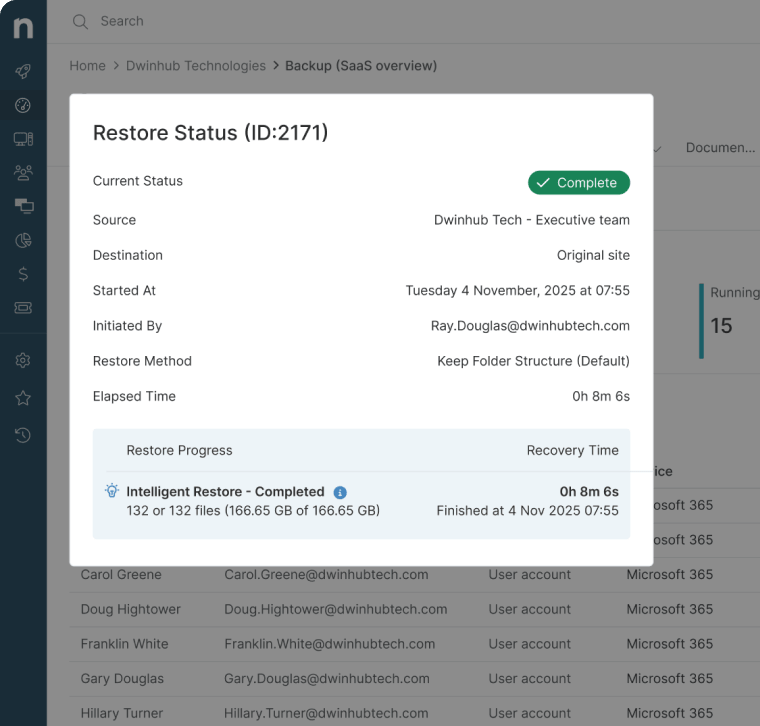
Features
- Daily automated backups with full-change journaling. Because every change to your QBO environment is logged rather than overwritten, you can retrieve any prior version of a transaction, invoice, or list item.
- Point-in-time, one-click restore. With NinjaOne, recovery isn’t limited to rolling back the whole account. You can restore an invoice or batch of transactions to the exact moment before an error occurred.
- Broad object coverage. Coverage extends across 40+ QBO object types, all of which are backed up individually for exact search and recovery. These cover not just invoices and payments but also vendors, attachments, and charts of accounts.
- Native integration into one console. For MSPs managing multiple layers of protection per client, QBO backup doesn’t require a separate login, contract, or admin workflow since it lives in the same console already used to manage endpoints and other SaaS backups.
- SOC 2 certification + encryption in transit/at rest. Backup data is protected both while it’s being transferred and while it’s stored, and NinjaOne’s SOC 2 certification gives buyers third-party–audited assurance over its security, availability, and confidentiality controls.
Customer story
As an MSP providing IT assistance to businesses in different industries, GS4 needed to act quickly when one of its medical clients suddenly experienced hardware failure and lost access to 6 TB worth of information. With the help of NinjaOne Backup, the team managed to restore all the data in less than 4 hours, avoiding what could have been $50,000 in lost revenue.
“For MSPs serving medical clients where downtime is never an option, you need a backup solution you can trust completely,” said Alex Soran, IT consultant to GS4. “NinjaOne gives us that confidence. It’s always there, it always works, and when we needed it most, it delivered.”
Read more NinjaOne customer stories or check out more NinjaOne reviews.
NinjaOne G2 ratings and review count
Category | NinjaOne Rating |
| Overall | 4.7 out of 5 (5,036) |
| Has the product been a good partner in doing business? | 9.4 |
| Quality of Support | 9.1 |
| Ease of Admin | 9.1 |
| Ease of Use | 9.1 |
NinjaOne Capterra ratings and review count
| Category | NinjaOne Rating |
| Overall | 4.7 out of 5 (297) |
| Ease of Use | 4.7 |
| Customer Service | 4.7 |
| Features | 4.5 |
| Value for Money | 4.6 |
Why NinjaOne is listed first
NinjaOne sits at the top of our list for its high ranking across relevant G2 and Capterra categories relative to the other solutions discussed in this article. Additionally, with features such as full platform consolidation, broad object coverage, and daily automated backups, NinjaOne combines the breadth and depth of protection that makes it a fitting choice for organizations evaluating QBO backup.
With all this said, another solution may be best for businesses with no interest in broader endpoint-management tooling or that prefer software dealing with backing up SaaS platforms like QBO rather than a broader IT platform.
Pricing for the #1 endpoint management software
Pay monthly or annually with flexible contracts.
2. Skyvia
Skyvia is a broad cloud data integration platform with backup as one module among several, and QuickBooks Online is one of its supported connectors. Skyvia’s backup product offers automatic daily and on-demand manual backups, alongside restore for individual records or even specific field values as well as the ability to restore to a different QBO account than the one backed up.
Best for
Skyvia is a fitting solution for businesses or IT teams already using it for broader data integration or ETL work who want QuickBooks Online backup as an added capability within the same platform.
Features
- Intuitive interface. Skyvia’s clean interface enables users to review snapshots and restore records with ease. (Verified Capterra Review)
- Integrations. Users have praised Skyvia for its simple yet powerful integrations with other products, saving significant time and resources. (Verified Capterra Review)
- Simple setup. Setting up the solution is a straightforward process, and once fully configured, Skyvia requires minimal oversight. (Verified Capterra Review)
Shortcomings
- Learning curve. According to some reviews, it can take a while to fully understand Skyvia’s more advanced configurations. (Verified G2 Review)
- Error messages. A few reviews have pointed out that the platform’s error messages can be too technical for non-technical users. (Verified G2 Review)
- Documentation. Users say they would appreciate more comprehensive documentation for advanced use cases. (Verified G2 Review)
Pricing approach
Skyvia’s backup product uses a pay-per-storage-volume model, with a free plan capped at 1 GB of storage. Note that this differs from Skyvia’s other bundled products; for example, its data integration product’s free plan is capped by record count rather than storage.
Deployment and onboarding considerations
Skyvia is a cloud-based solution, with no software installation needed; QBO backup can be configured directly from a web browser.
Skyvia G2 ratings and review count
| Category | Skyvia Rating |
| Overall | 4.8 out of 5 (322) |
| Has the product been a good partner in doing business? | 9.3 |
| Quality of Support | 9.3 |
| Ease of Admin | 9.4 |
| Ease of Use | 9.3 |
Skyvia Capterra ratings and review count
| Category | Skyvia Rating |
| Overall | 4.9 out of 5 (116) |
| Ease of Use | 4.8 |
| Customer Service | 4.8 |
| Features | 4.7 |
| Value for Money | 4.8 |
3. Redstor
Redstor is a broad multi-tenant backup and disaster recovery platform covering servers and endpoints, alongside such services as Microsoft 365, Google Workspace, Salesforce, and QuickBooks (both Online and Desktop). Its QBO backup capability uses proprietary InstantData™ technology, which allows quick access to backed-up data outside QBO, and AI-driven malware detection to scan backups and isolate suspicious files.
Best for
Redstor is a viable tool for MSPs and IT teams wanting QBO backup as one module within a broad infrastructure-and-SaaS-backup platform, particularly where the malware/ransomware scanning of backups is a priority.
Features
- Easy setup. Redstor users appreciate that the platform is easy to set up and configure, with no downtime experienced. (Verified G2 Review)
- Customer support. Reviews also mention that Redstor’s customer support provides helpful and efficient feedback. (Verified G2 Review)
- Deployment. Users have expressed gratitude for the ability to deploy and install Redstor to multiple endpoints and servers. (Verified G2 Review)
Shortcomings
- Error messages. A few users have pointed out that they can’t retrieve the error logs when an account fails to back up to Redstor. (Verified G2 Review)
- Performance on Safari. According to reviews, Redstor’s online performance on the Safari browser still needs improvement. (Verified G2 Review)
- Complex navigation. Users have mentioned that Redstor can still be improved in terms of navigation and troubleshooting. (Verified G2 Review)
Pricing approach
Redstor uses per-organization pricing, starting at around $15 per month, with volume-based and bundling discounts.
Deployment and onboarding considerations
The solution uses cloud-based, agentless deployment and is managed via a centralized app that also covers other backup targets (e.g., Microsoft 365).
Redstor G2 ratings and review count
| Category | Redstor Rating |
| Overall | 4.6 out of 5 (111) |
| Has the product been a good partner in doing business? | 9.3 |
| Quality of Support | 9.1 |
| Ease of Admin | 9.0 |
| Ease of Use | 9.2 |
*While Redstor does have a dedicated Capterra page, it holds no reviews at the time of writing.
4. SysCloud
SysCloud is a backup-as-a-service (BaaS) platform offering SaaS data protection across services like Slack, HubSpot, Salesforce, and QuickBooks Online. It supports all QBO plans (i.e., Simple Start, Essentials, Plus, Advanced), runs automated backups every 24 hours (with an on-demand option), and is SSAE18/SOC 2 certified.
Best for
SysCloud is a suitable option for SMBs and accounting firms that want QBO backup bundled into a broader multi-SaaS backup solution.
Features
- File retrieval. Users of SysCloud have expressed gratitude toward being able to easily retrieve their backed-up files. (Verified G2 Review)
- Intuitive setup. Reviews say that the platform is easy to configure and use after a quick setup. (Verified G2 Review)
- Customer support. Users also appreciate SysCloud’s customer service, reporting that the support team checks in every 3 months. (Verified Capterra Review)
Shortcomings
- DLP measures. Users describe SysCloud’s DLP features as more reactive than proactive, stating that they’d appreciate more insight into the causes of some data sharing errors. (Verified Capterra Review)
- File restore. According to some reviews of SysCloud, it can take some time for individual files or documents to be restored. (Verified Capterra Review)
- Help desk. A few users have commented that SysCloud’s help desk section can be improved to make it easier to navigate. (Verified G2 Review)
Pricing approach
SysCloud’s QuickBooks Online backup is priced per QBO company backed up, with a 30-day free trial before commitment and further add-on pricing for features like ransomware protection, compliance alerts, and eDiscovery search.
Deployment and onboarding considerations
SysCloud uses cloud-based deployment, with no installation required.
SysCloud G2 ratings and review count
| Category | SysCloud Rating |
| Overall | 4.8 out of 5 (37) |
| Has the product been a good partner in doing business? | 9.5 |
| Quality of Support | 9.5 |
| Ease of Admin | 9.5 |
| Ease of Use | 9.6 |
SysCloud Capterra ratings and review count
| Category | SysCloud Rating |
| Overall | 4.7 out of 5 (7) |
| Ease of Use | 4.9 |
| Customer Service | 5.0 |
| Features | 4.6 |
| Value for Money | 4.7 |
5. Rewind
Rewind is a SaaS backup platform founded in 2015 that supports services such as Shopify, GitHub, Jira, Confluence, and QuickBooks Online. It’s marketed toward accounting firms and MSPs managing multiple client files, offering both granular and full account-level restore, with backups triggered whenever changes are made in QBO.
Best for
Rewind is best suited for accounting firms and MSPs who want a SaaS backup specialist (rather than a broad IT platform) offering both granular and account-level restore options.
Features
- Encryption. Users of Rewind appreciate the platform’s encryption function, providing an extra layer of security for backed-up data. (Verified Capterra Review)
- Edit restores. Many users say they’re grateful for the ability to restore their data on Rewind after making bulk edits to it. (Verified G2 Review)
- Easy setup. According to reviews, Rewind’s setup is a straightforward process, and the platform requires minimal maintenance. (Verified G2 Review)
Shortcomings
- Complex user interface. Some reviews point out that Rewind’s user interface could be improved, especially when adding new clients. (Verified Capterra Review)
- Backup notice. Users say that they would appreciate a heads-up on backups running immediately after the platform is fully configured. (Verified G2 Review)
- Short data retention period. A few users have mentioned that the data retention period on Rewind can be longer. (Verified G2 Review)
Pricing approach
Rewind’s QuickBooks Online pricing is per file/month. Its “Flex” plan, at $16 a month per QBO file, involves a decreasing per-file cost as more files are connected.
Deployment and onboarding considerations
The deployment of Rewind is cloud-based, with reportedly fast setup and a free trial offered before commitment.
Rewind G2 ratings and review count
| Category | Rewind Rating |
| Overall | 4.7 out of 5 (103) |
| Has the product been a good partner in doing business? | 9.9 |
| Quality of Support | 9.5 |
| Ease of Admin | 9.7 |
| Ease of Use | 9.5 |
Rewind Capterra ratings and review count
| Category | Rewind Rating |
| Overall | 4.2 out of 5 (13) |
| Ease of Use | 4.3 |
| Customer Service | 4.0 |
| Features | 4.3 |
| Value for Money | 4.4 |
Comparison of G2 scores for QuickBooks Online backup software
All ratings and review counts as of September 2026.
| Category | NinjaOne | Skyvia | Redstor | SysCloud | Rewind |
| Overall | 4.7 out of 5 (5,036) | 4.8 out of 5 (322) | 4.6 out of 5 (111) | 4.8 out of 5 (37) | 4.7 out of 5 (103) |
| Has the product been a good partner in doing business? | 9.4 | 9.3 | 9.3 | 9.5 | 9.9 |
| Quality of Support | 9.1 | 9.3 | 9.1 | 9.5 | 9.5 |
| Ease of Admin | 9.1 | 9.4 | 9.0 | 9.5 | 9.7 |
| Ease of Use | 9.1 | 9.3 | 9.2 | 9.6 | 9.5 |
Comparison of Capterra scores for QuickBooks Online backup software
All ratings and review counts as of September 2026.
| Category | NinjaOne | Skyvia | Redstor | SysCloud | Rewind |
| Overall | 4.7 out of 5 (297) | 4.9 out of 5 (116) | No reviews at time of writing | 4.7 out of 5 (7) | 4.2 out of 5 (13) |
| Ease of Use | 4.7 | 4.8 | No reviews at time of writing | 4.9 | 4.3 |
| Customer Service | 4.7 | 4.8 | No reviews at time of writing | 5.0 | 4.0 |
| Features | 4.5 | 4.7 | No reviews at time of writing | 4.6 | 4.3 |
| Value for Money | 4.6 | 4.8 | No reviews at time of writing | 4.7 | 4.4 |
Our best QuickBooks Online backup software comparison and ranking methodology
This review and ranking of the best QuickBooks Online backup software in 2026 is based on a transparent, structured methodology. The process includes:
Data Sources: Aggregated ratings and review counts from G2 and Capterra as of September 2026.
Final Score is the average of up to ten metrics, each converted to a 0–10 scale:
- G2: Good partner in doing business
- G2: Quality of support
- G2: Ease of admin
- G2: Ease of use
- Capterra: Ease of use (multiplied by 2 to match G2’s 0 to 10 scale)
- Capterra: Customer service
- Capterra: Features
- Capterra: Value for money
- G2: Review volume, scaled from 0 to 10 across all ranked tools
- Capterra: Review volume, scaled from 0 to 10 across all ranked tools
Review volume is scaled logarithmically and then mapped so the tool with the fewest reviews scores 0 and the tool with the most scores 10. This keeps a handful of reviews from being treated the same as thousands, without letting review count alone decide the ranking.
Not every tool publishes all ten metrics. Where a metric doesn’t exist for a tool, that metric is left out of the average entirely rather than counted as zero.
Data Freshness: All data was collected and last validated on September 15, 2026.
How to choose the best QuickBooks Online backup software
With several QuickBooks Online backup solutions differing in scope, pricing structure, and restore capabilities, the right choice ultimately depends on matching a tool’s strengths to your business’s operational, security, and budget requirements.
Here are some factors to consider before you finalize your purchase:
- Required capabilities. Not every solution offers the same restore granularity; some allow rolling back a single invoice or record, while others are limited to full-account restores. Decide upfront whether your business needs item-level precision or whether a broader rollback is sufficient.
- Integrations and platform scope. Some tools bundle QBO backup within a broader multi-SaaS or IT platform; others focus on SaaS application backup. If your team already manages other tools through a certain platform, consolidating QBO backup into that same console can reduce administrative overhead; if not, a specialist tool may be simpler to adopt.
- Security and compliance. Look for encryption in transit and at rest, RBAC, and relevant certifications like SOC 2, especially if you’re an MSP handling multiple clients’ financial data rather than one internal account. Compliance needs like audit trails should also guide which retention and monitoring features are nonnegotiable.
- Scalability and multi-client management. For accounting firms and MSPs managing several QBO companies, it’s important to check whether pricing and administration scale sensibly. Some tools price per company or per file, with declining costs at higher volumes, while others are structured around per-user licensing that may not translate well to multi-client use.
- Customer support and responsiveness. Since backup tools are usually relied on during high-stress recovery situations, the quality and availability of support (e.g., live chat, response times) can matter as much as the technical feature set.
Choose the right QuickBooks Online backup solution for your business
Overall, QuickBooks Online may cover platform-level continuity, but specialized backup software fills a necessary gap: protecting against accidental deletion, sync errors, and account-level incidents that Intuit’s infrastructure isn’t designed to fully address. With capabilities like automated daily backups and granular restore, these tools give businesses a layer of control and recoverability that native retention alone can’t guarantee.
Still, as mentioned earlier, not all QBO backup software is built the same. Choosing the right one comes down to matching a solution’s restore capabilities, security certifications, and support quality to your organization’s specific scalability and compliance needs. Take the time to revisit the solutions covered here, weigh them against your organization’s priorities, and choose the one that fits best.
If you’re looking for a QuickBooks Online backup solution with daily automated backups, granular point-in-time restore, and native integration into a broader IT operations console, NinjaOne Backup is worth trying out. Its SaaS backup capability covers 40+ QBO object types and lives in the same platform that MSPs and IT teams already use for endpoint management and other SaaS backups, consolidating protection for client and business-critical financial data into one place.
Watch a free demo or start your free trial to see it in action.